
Select any screenshot to view it at full size. Screenshots show example accounts and may include historic dates or deadlines.
Description
When Batch prepares a publisher payment, only invoices and credits in the Current period are eligible to be included. Future-due invoices cannot be included in the remittance unless they are moved into the Current Period.
Relevant Definitions
What do we mean by “Current”? The Current period includes outstanding invoices whose due date falls prior to or within the present month, plus all outstanding credits.
What do we mean by “Future-due”? Future-due refers to outstanding invoices due after the end of present month.
Process
To include future-due invoices in your payment, stores can move a single future-due invoice to the current period, or they can move multiple invoices to the current period at once.
Paying a single future-due invoice
- Locate and authorize the future-due invoice you want to pay early
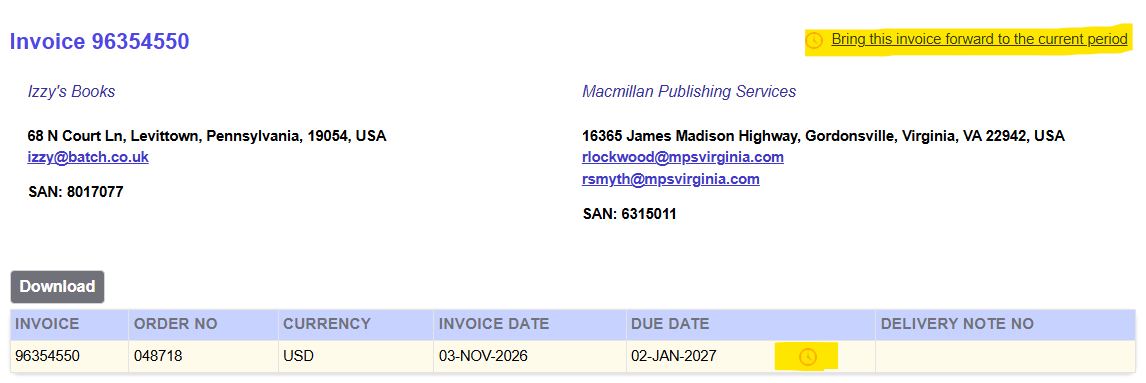
- Click through to the invoice screen.
- Click on one of the two orange clock icons located in the header of the invoice screen.
Paying multiple future-due invoices
- Authorize all the future-due invoices you want to include in your payment to the publishers
- Go to the Future Summary via the Period Summaries dropdown menu
- Click on the orange clock icon in the Authorized column for the vendor whose invoices you want to include in the payment.
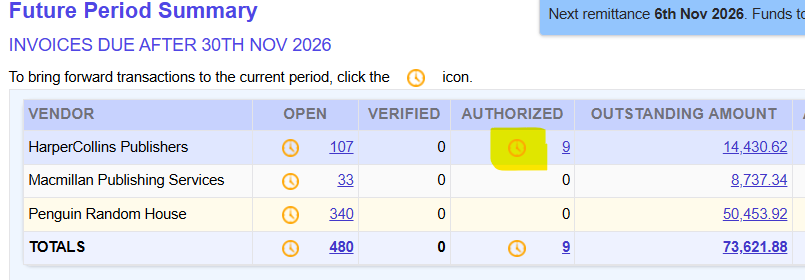
Warning! The Open column also has the orange Move-Forward clock icons, but we strongly recommend only moving forward using the clock icon in the Authorized column. Once a future-due invoice has been moved to the current period, it can’t be undone.
Sign of Success
An invoice that has a white C in a blue square next to the due date indicates the invoice is in the current period and will be included with your next payment to the publishers if authorized.
