
Select any screenshot to view it at full size. Screenshots show example accounts and may include historic dates or deadlines.
Batch allows you to pay multiple publishers with one combined payment. We send payments and remittance details to the publishers every Friday morning, plus the last business day of the month.
Step 1: Log into your Batch portal and go to the Current Period Summary
The Current Period Summary is the screen you see upon logging into your Batch portal and reflects invoices due by the end of the month and any available credits. To view the list of transactions for each publisher, click on the numbers in the table.
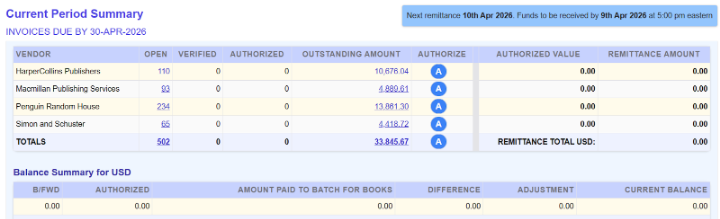
Step 2: Authorize the invoices and credits you want to pay for each vendor.
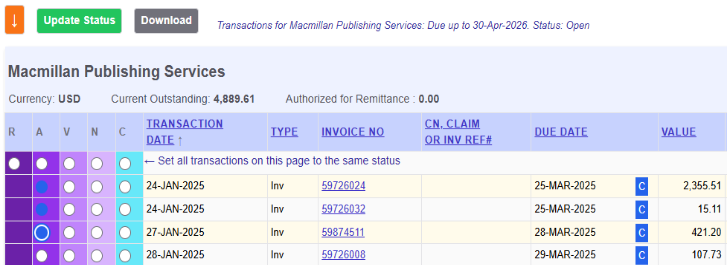
- Drill down into each publisher by clicking on the links within the summary table to view the individual invoices and credits.
- Check off the Authorize status update radio button for each invoice or credit you want to pay.
- Click the green update status button
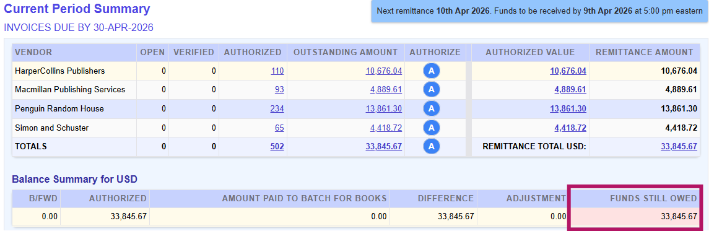
Step 3: Return to the Current Period Summary and locate your payment amount.
- Locate the Funds Still Owed field in the Balance Summary table beneath the list of publishers to find your payment amount.
Step 4: Electronically transfer one combined payment for all vendors to Batch.
- Use Batch’s bank account information to electronically transfer funds to Batch for your payment.
- Account Name: Batch for Books
- Bank: M&T
- Account #: 9887664507
- Routing #: 022000046
- The payment deadline is 6 pm Eastern on the evening before payout. This applies to both weekly and monthly payments.
- After Batch sends the payment to the publishers, your invoices and credits will be marked as Cleared and removed from the summary table. Payment details can be found through Period Summaries Past remittances on your Batch portal.
- More information on transferring funds to Batch can be found on the Payments page.